I write in Obsidian. Every day. Notes, ideas, drafts, plans. It’s where my brain lives.
So when I needed a blogging workflow, the last thing I wanted was another tool. Another login. Another interface to learn.
I wanted to write where I already write. And publish without thinking about it.
The Problem With Most CMSs
Let me tell you what happens with a traditional CMS.
You write something. Maybe in your notes app, maybe in a Google Doc. Then you copy it. Paste it into your CMS. Fix the formatting that broke. Add your images one by one. Preview it. Realize something looks wrong. Fix it. Preview again. Finally hit publish.
That’s a lot of friction for someone who just wants to write and ship.
And don’t get me started on the “headless CMS” solutions. Contentful, Sanity, Strapi. Great tools. But now you’re managing content in one place, code in another, and constantly context-switching between them.
I’ve done it. It works. But it never felt right.
Why Obsidian?
Obsidian is where I already think. It’s fast. It’s local. It’s markdown. And it’s infinitely extensible.
Here’s what my daily workflow already looked like:
- Morning brain dump in Obsidian
- Meeting notes in Obsidian
- Project planning in Obsidian
- Random ideas throughout the day in Obsidian
Notice a pattern?
Adding “blog writing” to that list wasn’t a workflow change. It was just another folder.
What the Plugin Actually Does
Let me get technical for a second.
The plugin does a few key things:
1. Live Preview
When I’m writing a draft, I can open a side panel that shows exactly how the post will look on my site. Not a markdown preview. The actual rendered page, pulled from my local Astro dev server.
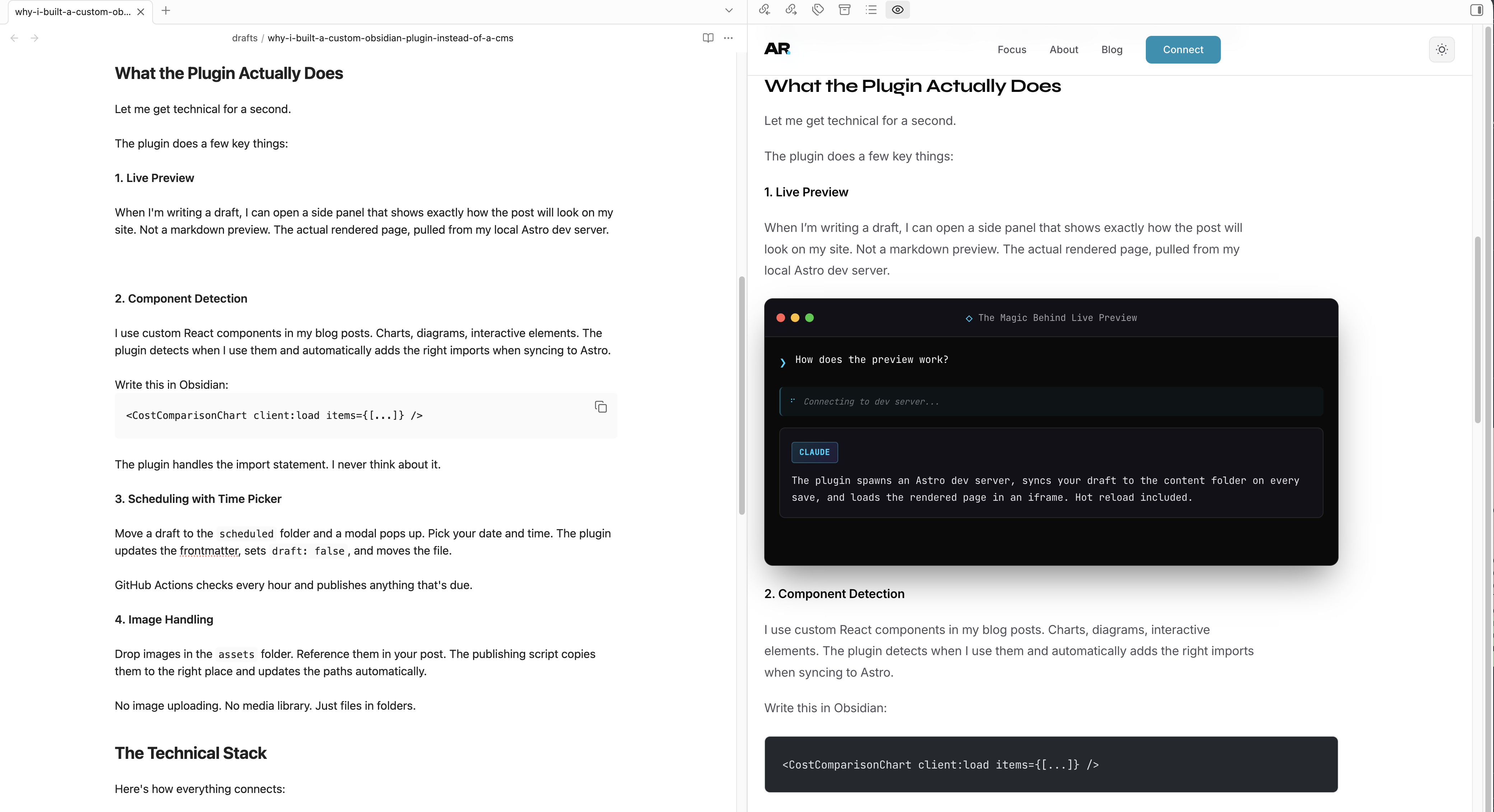
That’s Obsidian on the left, my actual website on the right. Same content. Real-time sync. I make a change, save, and the preview updates. It’s the closest thing to “what you see is what you get” without using an actual WYSIWYG editor.
2. Component Detection
I use custom React components in my blog posts. Charts, diagrams, interactive elements. The plugin detects when I use them and automatically adds the right imports when syncing to Astro.
Write this in Obsidian:
<ClaudeCodeUI
  client:load
  title="Very Important AI Business"
  prompt="Make me a sandwich"
  thinking="Analyzing bread inventory..."
  response="I can't make you a sandwich, but I can write you 500 lines of code that theoretically could control a sandwich-making robot."
/>
The plugin handles the import statement. I never think about it.
But here’s the real magic: I built a template system. I type /comp and get a dropdown of every custom component I’ve built. Pick one, and it drops in a fully-formed template with all the props ready to edit. Real-time tweaking. No docs lookup. No copy-pasting from old posts.
3. Scheduling with Time Picker
Move a draft to the scheduled folder and a modal pops up. Pick your date and time.
Choose when this post should go live:
The plugin updates the frontmatter, sets draft: false, and moves the file. Quick buttons for common times (“Today 8pm”, “Tomorrow 9am”) because who wants to use a date picker more than necessary?
GitHub Actions checks every hour and publishes anything that’s due.
Oh, and here’s the best part: everything in the scheduled folder stays editable. Found a typo in a post scheduled for tomorrow? Fix it right there. Want to tweak a headline? Change it. The next publish cycle picks up your changes automatically. No “unpublish, edit, republish” dance. Just edit and go.
4. Image Handling
This one is borderline magical.
I can drag an image from anywhere on my computer. Desktop. Downloads folder. A random screenshot I just took. Drop it into my draft, and the plugin automatically copies it to my vault’s assets folder and inserts the correct relative link.
No image uploading. No media library. No manual path typing. Just drag, drop, done.
5. Grammar and Spelling (with Kimi)
I integrated Kimi 2.5 for a quick grammar and spelling check right inside Obsidian. One command, and it scans my draft for typos, awkward phrasing, and those em dashes I keep accidentally using.
It’s not trying to rewrite my voice. It’s catching the stuff I miss when I’m writing at 2am. Fast, non-intrusive, and surprisingly good at knowing when to leave things alone.
The Technical Stack
Here’s how everything connects:
| Piece | Role |
|---|---|
| Obsidian | Writing and editing |
| Custom Plugin | Preview, sync, scheduling |
| Astro | Static site generation |
| GitHub Actions | Hourly publish checks |
| Vercel | Hosting and deployment |
The beauty is that each piece does one thing well.
Obsidian handles the writing experience. Astro handles the rendering. GitHub Actions handles the automation. Vercel handles the hosting.
No monolithic CMS trying to do everything poorly.
Why Astro?
Astro deserves its own section.
It’s a static site generator that lets you use React components when you need interactivity, but ships zero JavaScript by default. Perfect for a blog.
The content collections feature is exactly what I needed. Define a schema for your frontmatter, drop markdown files in a folder, and Astro handles the rest.
// This is all you need to define a blog post schema
const blog = defineCollection({
  schema: z.object({
    title: z.string(),
    description: z.string(),
    date: z.date(),
    draft: z.boolean().optional(),
    tags: z.array(z.string()).optional(),
  }),
});
MDX support means I can use React components inline. The charts and interactive elements in my posts? Just components. No special syntax. No shortcodes.
Why Not Just Use a Headless CMS?
Fair question. Here’s my honest answer.
Contentful, Sanity, etc. are great if you have a team. Multiple editors. Complex approval workflows. Localization needs.
I’m one person writing blog posts.
Adding a headless CMS would mean:
- Another service to pay for
- Another API to manage
- Another place where my content lives
- Another thing that can break
My current setup? It’s just files. Markdown files in folders. If Obsidian disappeared tomorrow, I’d still have my content. If the plugin broke, I could manually copy files. If GitHub Actions failed, I could push to Vercel directly.
The whole system is resilient because it’s simple.
The Workflow in Practice
Let me walk through what publishing a post actually looks like.
Writing:
- Create a new file in
drafts/ - Write in Obsidian like I always do
- Use the side preview to see how it looks
- Add components where I want interactivity
Scheduling:
- Cmd+P → “Move to Scheduled”
- Pick a date and time in the modal
- Done
Publishing: GitHub Actions runs every hour. If something is due, it:
- Copies the file to the Astro content directory
- Processes any images
- Deploys to Vercel
- Archives the original in
published/
I don’t think about any of this. I write. I schedule. Posts appear.
Building It Was Fun
Here’s the thing nobody talks about with custom tools: building them is part of the value.
I know exactly how this system works because I built it. When something breaks, I know where to look. When I want a new feature, I add it.
Last week I wanted quick schedule buttons. “Today 8pm”, “Tomorrow 9am”. Added them in 20 minutes.
Try asking Contentful for a custom feature.
When This Approach Doesn’t Work
Let me be honest about the limitations.
This setup is great for:
- Solo creators
- Developers comfortable with code
- People who already use Obsidian
- Static or mostly-static sites
It’s not great for:
- Teams with non-technical editors
- Sites that need real-time content updates
- Complex multi-language setups
- People who want a visual page builder
If you’re building a marketing site with a team of content editors, use a CMS. Seriously. That’s what they’re for.
But if you’re a solo dev who writes in markdown and wants a fast, simple, future-proof blogging setup? This approach is hard to beat.
Bonus: Analytics with PostHog
Since we’re talking about the full stack, I have to mention PostHog.

I tried Google Analytics. I tried Plausible. I tried Fathom. PostHog is the one that stuck.
Why? Because it’s not just “how many people visited.” It’s:
- Session recordings - Watch exactly how people read your posts (creepy in a useful way)
- Feature flags - A/B test different headlines or layouts
- Funnels - See where people drop off in your content
- Dashboards - Build exactly what you want to see
The free tier is absurdly generous. And because it’s open source, I know exactly what data is being collected.
For a blog, I mostly care about:
- Which posts are getting traffic
- How long people actually read (not just bounce)
- Where traffic comes from
PostHog gives me all of that in a single dashboard. No premium tier needed. Just works.
Try It Yourself
The plugin isn’t published to the Obsidian community yet. But the concept is simple enough to recreate:
- Set up Astro with content collections
- Create an Obsidian vault in your project
- Build a plugin that syncs files and manages the dev server
- Add GitHub Actions for scheduled publishing
Or just use the good old “write markdown, git push, deploy” workflow. That works too.
The point isn’t the specific tools. It’s finding a workflow that matches how you already work.
For me, that’s Obsidian. For you, it might be something else.
But whatever it is, it should feel invisible. The best workflow is the one you don’t think about.
Want to see the actual plugin code? Reach out. Happy to share.
And if you’re building something similar, I’d love to hear about it.